
A Chat Interface Is Not A Side Door
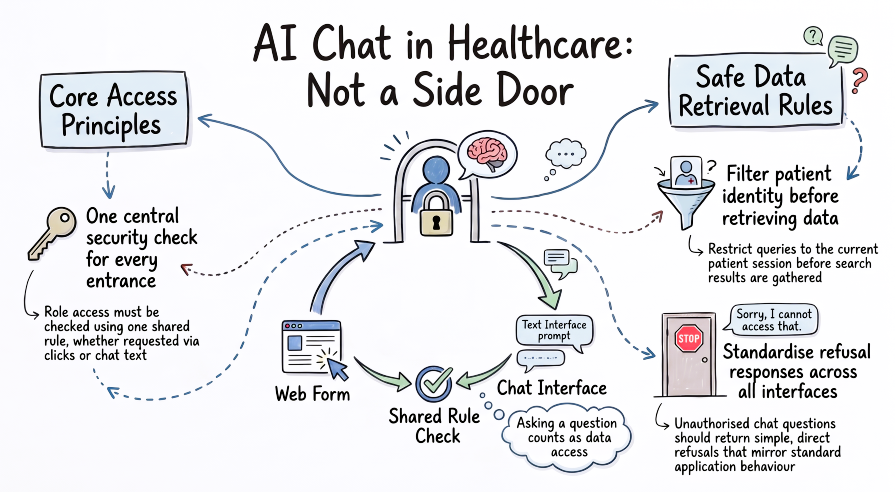
An administrative user opens the web application. They can see appointments, they can see who’s coming in and who’s related to whom, and maybe that’s about it. The clinical record itself, the conditions, the medications, the observations, stays out of view. Nobody had to think hard about this. It’s simply what the role allows.
Now put a chat interface in front of the same user. They can still see appointments. But this time there’s a text box, and the text box accepts anything. “What medication is the patient on?” is just as easy to type as “When is their next appointment?” The interface doesn’t visibly stop them from asking.
It’s tempting to treat that as a different problem from the one the web application already solved. A conversation feels less like opening a record and more like, well, a conversation. Surely the checks that stop someone browsing to a page they shouldn’t see don’t need to be reinvented for a text box.
That assumption was worth testing properly, which made us ask the question:
Are permissions in chat any different to those in the app?
Somewhat obviously, they aren’t. What a role is allowed to see doesn’t change because the request arrived as a sentence instead of a click. The previous post in this series argued that an agent is another user of the application, not a feature bolted onto it. The same argument holds for permissions: whatever decides what a role can see in the application should decide the same thing in the conversation, because it is the same record either way.
TL;DR
🚪 A chat interface isn’t a side door. The same record sits behind it.
🪪 One access check, reused everywhere. Not a UI version and a chat version.
🧾 What you can’t see stays what you can’t see, whichever interface you ask through.
🎯 Patient scoping applies to retrieval, not just to what ends up on screen.
🗣️ Asking is a form of access. A question about a record is a read of that record.
The same badge, whichever door you use
Return to the hospital ward from the previous post. The agency member of staff signs in, and their badge opens the doors their role is meant to open. It’s worth noticing what the badge does not do: it does not care which entrance they used to get to it. Whether they came in through reception or through a side corridor by the loading bay, the same badge, checked against the same list, opens (or doesn’t open) the same doors.
A permissions model that works this way is doing something specific. It ties access to who you are, not to which door you happened to walk through. Reimplementing the check at every entrance, one version for the front door and a slightly different one for the side corridor, invites the two to drift apart. Reusing one check everywhere means there’s only ever one answer to “is this role allowed to see this”.
In the example application, the web interface decides whether a staff member has clinical access using a single function, consulted by the page-level middleware for every clinical page. Administrative users are limited to appointments, patients and related people; clinical staff see the full record. That’s the front door.
The chat interface is the side corridor, and it consults the very same function. The router that classifies an incoming question sends anything the Patient Record Explorer or Patient Record Summariser would otherwise handle to a fixed refusal when the user isn’t clinical staff. The Patient Record Enquirer, which answers questions from a library of pre-written searches, checks each individual question template against its own allow-list of the ones an administrative user is permitted to ask, mirroring what that same user is permitted to browse to in the application. An administrative user asking “who is the next of kin?” gets an answer, because related people are exactly what their role can already see on screen. The same user asking about current problems does not, for the same reason they wouldn’t find a list of current problems on their screen either.
flowchart LR
    subgraph UI[Web interface]
        direction TB
        A("Staff member opens a patient page") --> B("Page middleware")
    end

    subgraph AG[Chat interface]
        direction TB
        C("Staff member asks a question") --> D("Router and sub-agent")
    end

    subgraph CHK[One check]
        direction TB
        E("Role-access function")
    end

    B --> E
    D --> E
    E --> F("Patient record")

    classDef base fill:#437c9f,stroke:#2f5f79,color:#ffffff,stroke-width:1px;
    classDef highlight fill:#6dc067,stroke:#437c9f,color:#1f2d1f,stroke-width:1.2px;
    classDef group fill:#ffffff,stroke:#437c9f,color:#2f5f79,stroke-width:1px;
    class A,B,C,D,F base;
    class E highlight;
    class UI,AG,CHK group;
    style UI rx:10,ry:10
    style AG rx:10,ry:10
    style CHK rx:10,ry:10
    linkStyle default stroke:#437c9f,stroke-width:1.2px;
The principle we landed at, wasn’t “build role checks into the agent”. It’s “don’t build a second set of role checks at all”. Wherever the answer to “can this role see this?” already lives, the agent should be asking it the same question the application asks, rather than arriving at its own answer independently.
Asking is still a form of access
It’s easy to think of the conversation as a layer that sits above the record, one step removed from it, the way a summary sits one step removed from what it summarises. But a question about a record is a read of that record, whether or not the answer is shown in full.
This matters most where an agent handles something the application already treats carefully. When a clinical document is uploaded through the chat interface in the example application, the extracted content isn’t shown back to a user without clinical access, in the same way the record itself isn’t shown to them elsewhere in the application. The upload can happen, the document is filed, but the same boundary that governs what a role can read in the application governs what gets surfaced about it in the conversation.
It would have been simpler to treat “uploading a file” as an administrative act, separate from “reading a clinical record”, and show the extracted content back to whoever uploaded it as a courtesy. Maybe that’s precisely the kind of shortcut that reopens the side door. The action of asking a chat interface to process something clinical is still clinical access, and it’s worth treating it that way even when it doesn’t feel like “opening a record” in the way clicking through to a patient page does.
The record stays scoped to the patient
Permissions decide what kind of information a role can see. A second, related question is whose record they’re looking at, and it applies regardless of role.
In the web application, every query for a patient’s data is scoped to that patient; a record ID belonging to somebody else simply isn’t found, whoever is asking. The same discipline carries into retrieval. When the Patient Record Explorer or the Patient Record Summariser search the semantic index built over the FHIR narratives, described in the previous post and explored further later in this series, the patient identifier is applied as a filter before anything is retrieved, not afterwards as a check on what came back. The Enquirer’s pre-written searches work the same way: the patient is substituted into the query before it runs, alongside the role check described above, so a single step confirms both is this role allowed to ask this and is this the right patient’s record.
Scoping before retrieval rather than after matters for the same reason patient scoping matters in the application generally: it’s the difference between a record never being found and a record being found, then withheld. The first is simpler to reason about and leaves less room for a withheld result to leak information through its very absence.
A brief aside, since it’s a question of context rather than permissions: the patient a conversation is scoped to is fixed for that conversation, in the same way a session belongs to one patient in the example application. There’s no “now show me the same thing for a different patient” mid-conversation, because the patient a request resolves against comes from the session it’s part of, not from anything a person could type. How context is carried and managed across a conversation is a thread worth its own treatment, and it’s one the later, more technical post in this series, on agent workflow, picks back up.
Considerations worth weighing
A few further questions tend to arise in practice.
- Where should the check live? A single, shared function, api or agent tool call is easier to reason about than one written twice, but it also means every caller has to remember to consult it. Whether that’s enforced by convention or by the platform is a design choice worth making deliberately.
- What granularity does a role need? The example application draws its line at whole resource types: administrative users can see appointments and related people, clinical staff see the full record. A finer-grained model, down to individual fields or events, is possible but adds its own complexity to reason about and to explain.
- Roles, or SMART on FHIR scopes? The example application answers “can this role see this?” with a role check, consulted wherever it’s needed. SMART on FHIR offers a different mechanism for a similar decision: a client requests scopes, and the authorisation server grants or withholds them when it issues a token, before the client ever makes a request. The two aren’t in competition, and there’s no reason a scope couldn’t stand in for a role, or sit alongside one, wherever an application already has a place that decides who can see what. What matters is the principle this post has been making throughout: one check, whatever it’s built on, consulted the same way by every interface that asks, rather than a role check for the application and a separate scope check bolted onto the conversation.
- What does a refusal look like? A fixed, honest refusal is straightforward to build and easy to audit. A more nuanced one, explaining precisely why a question can’t be answered, may be more helpful but risks revealing more about the record than the refusal itself should.
- Does scoping happen early enough? Filtering a result set after retrieval is different from never retrieving it in the first place, particularly once that data has been passed to a language model.
Questions to ask of your own design
If you’re putting a chat interface in front of clinical data, these may be worth asking:
- Is there one place that decides what a role can see, consulted by every interface, or does each interface decide independently?
- Does asking a question about a record count as access to that record, even when the full answer isn’t shown?
- Is the patient identifier applied before data is retrieved, or only checked afterwards?
- If a role can’t see something in the application, can they still get it by asking for it in the conversation?
- Would a refusal in the chat interface match a refusal the same user would meet in the application?
- If your access model is built on scopes rather than roles, is it consulted consistently by every interface, or only at the point a token is issued?
An agent doesn’t get a different lock
The application already answers “what can this role see?” The chat interface doesn’t need a second answer to the same question. It needs to ask the first one.
The data used in the project to which this article relates was sourced exclusively from datasets that are known or assured to be synthetic, or have been intentionally created for illustrative purposes. The application described is a playground, built for experimentation, and has never been used in any real-life scenarios. It was created solely to demonstrate the concepts described in the article.
